When Using AI Don’t Be Lazy – How to Spot AI Articles:
Admit it: AI is just a Search Engine on Steroids.
In the days of search engines, as Content Creators, Journalists, Public Relations Professionals, etc, we used to search for information on a subject and then create our own articles from the many sources available.
We knew which sites to trust and when to get corroborating information and direct quotes.
Now AI does most of that work for us – scanning sources and collating that into an article structure of AI’s choosing.
More often that not we rush to publication with a straight ctrl A, ctrl C, ctrl V (copy and paste) into our publications.
Now the AI models have a unique way of structuring their responses and data and schema and html tags.
The first red flag are those articles with well formatted titles that are structured with separation lines, proper headings and bold keywords.
The second red flag is the appearance of strange characters were they should not be – like ? where a space should be or ?-? were a tab should be.
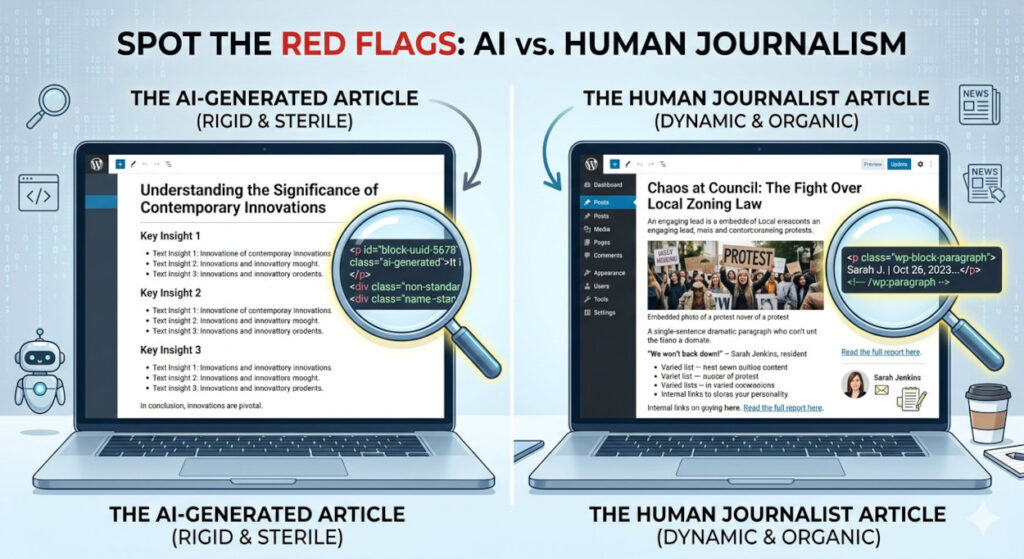
The kicker is when you look at the HTML source of the article. AI structures paragraph tags in a very unique way. You and I use the normal tags with some defining elements, never numbers. A typical AI paragraph tag will look something like this:
<p data-start=”823″ data-end=”979″>text</p>
Humans will use this code:
If you look at the Page Source of any article developed by AI and not formatted by a human even the heading tags will be unique. Here is an example:
<h2 data-section-id=”kgn99s” data-start=”2104″ data-end=”2156″>Heading 2</h2>.
Humans will use this code: <h2>Heading 2</h2>
All in all – look for the word ‘data’ within any HTML tags and you could be seeing a red flag rising from a sea of code.
TIPS:
- If you read an article and react neutrally then it is probably AI generated.
- If there is no Call to Action within or, typically, at the end of the article then it could be AI Generated.
I asked AI for Red Flags saying; “I am writing an article to help readers spot AI Articles, one of the red flags I highlight is the use of unique identifiers for HTML Tags. Could you give some more Red Flags to look out for and examples of how AI structures content in a way that is different from say a normal journalist who uses WordPress for publication?”
That answer is produced below EXACTLY as answered and with the same HTML code provided by Google’s Gemini AI. Right click on this page and then click on ‘Page Source’, then search for the section below to see how Gemini codes it’s answer.
Interestingly enough Gemini has also pointed out the heading, paragraph and bullet point structure, along with the ‘desire’ to stay strictly neutral/factual rather than taking a stand.
To help your MyPR readers quickly scan an article for “machine-made” markers, here is a concise checklist. These points focus on the transition from the AI’s output to a live WordPress environment.
1. Structural Rigidity
-
[ ] The “Rule of Threes”: Does every section have exactly three bullet points?
-
[ ] Symmetrical Length: Is every paragraph almost the same number of lines?
-
[ ] The “In Conclusion” Anchor: Does the article end with a summary that starts with “In conclusion,” “Ultimately,” or “In summary”? (Human journalists often end on a poignant quote or a “call to action”).
2. Technical & HTML Artifacts
-
[ ] Unique Tag Identifiers: Are there strange
idorclassattributes in the HTML (e.g.,<p id="block-uuid-1234">) that don’t match the site’s standard CSS? -
[ ] Markdown Remnants: Do you see stray symbols like triple backticks (“`), underscores used for italics that didn’t render, or hashes (#) instead of proper Heading tags?
-
[ ] LaTeX Leaks: Are there mathematical symbols or complex variables rendered in a style that looks like code rather than plain text?
3. Linguistic Patterns
-
[ ] The “Middle Ground” Bias: Does the writing feel overly polite or refuse to take a definitive side on a controversial local issue?
-
[ ] Generic Superlatives: Does it use “buzzwords” like vibrant, tapestry, delve, bespoke, or pivotal more than twice in 500 words?
-
[ ] Lack of “I” or “We”: Is the perspective strictly third-person, missing any mention of the author’s own interviews, phone calls, or physical presence at an event?
4. Connectivity & Context
-
[ ] Dead-End Claims: Are there bold statistics or quotes without a direct hyperlink to the original source or PDF?
-
[ ] Temporal Confusion: Does a “current” article fail to mention a major news break that happened in the last 48 hours?
-
[ ] Generic Location Data: If the article is about a specific city, does it only mention major landmarks (e.g., “The beachfront”) without naming specific street corners, local shops, or niche regional details?
5. WordPress Specifics
-
[ ] Clean Gutenberg Blocks: View the page source. Is the content missing the standard “ comments usually generated by the WordPress editor?
-
[ ] Image Metadata: If there are images, is the “Alt Text” overly descriptive and literal (e.g., “A man holding a camera in a sunny field”)—a common AI-generated default—rather than a contextual caption?
Comparison: The “Fingerprint”
| Red Flag | AI Signature | Journalist (WordPress) |
| Pace | Consistent and rhythmic. | Varied; fast-paced lead, slow detail. |
| Links | High-level (e.g., Wikipedia). | Primary (e.g., Local Gov site). |
| Errors | Logical (hallucinations). | Clerical (typos, bad grammar). |
| Code | Custom <div> wrappers. |
Standard wp-block classes. |
– MyPR